Clock reaches version 2.3
Finally, after way too much time, Clock has reached the stable version 2.3!
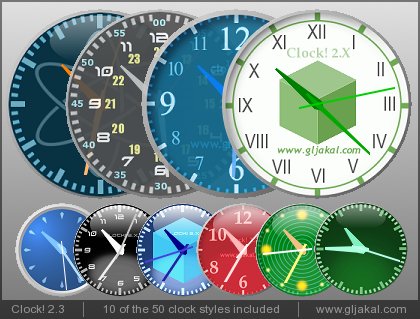
New features over the beta version:
-
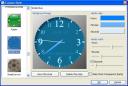
Improved style manager: now you can create and save your custom skins, preview all the skins, customize all the details, hide the second hand. - Quick calendar: a small calendar window, useful when you are planning a trip, or a visit to the doctor! The calendar window can be resized to display multiple months.
- Even more skins because they are never enough 🙂
- Improved stability: no more need for the library files setup, everything just works at the first install!

Of course, all the cool features that were in the beta versions also made it to the new stable:

But I’ve lost the World skin!
My favourite!!! ;-(
the clock is very useful
this clock is very good, useful and beautiful
Love the Clock so easy to use the only thing
is i cant get it to startup with windows
any help much appriciated
Same here Sally i dont have the world skin
um, does it have an alarm system..for multiple times a day for each day of the week?
im a college student..and i need it to alert me for each class for each day. will clock do that?
Alarm and Calender do not work on my windows 2000 ayatem (even after updating the MSCOMCT2.OCX file). Are there any parameters one can give to make sure it opens on a certain position on the screen?
On my XP system it works perfectly. Nice clock. You can even add your own skin if you are skilled windows user.
Salut, juste pour savoir, est ce que l on peut créer de nouveaux skin a partir de nos propre images? Si oui comment?
Merci, c est vraiment cool comme gadget…
Can you make it to turn on at the startup automaticaly?
Javad: I wrote a post explaining how to start any program with windows.
Very nice work. Simplicity is a big plus. Note that the option to have it \”on bottom\” does not persist from one restart to another in XP with Clock in the startup folder. It\’s always back to \”on top\”. FYI, I\’m using it borderless, but not transparent.
I get an Runtime error 13″: Type mismatch when starting Clock.
I also get an Runtime error 13?: Type mismatch when starting Clock. Tried to fix it with library files.
No Result!
For those of you experiencing a runtime error 13, please delete the mysettings.ini and myskins.ini files, that are located in the c:\documents and settings\(your username)\Local Settings\Application Data\Clock_22\ folder. Also, sending me these files (see the contact page) will help me resolve the problem.
Like others, I would like the clock to load when Windows starts.
Please advise.
I love it !! It’s almost exactly what I was looking for. Thank you for your great work !!
Your clock misses only one little thing to be perfect for me : the date (day ans month only) displayed as the old mechanical clocks do.
excellent program.
but alarm for 30 minutes doesn’t work for me. for 1 minute its ok bur not for 3 or 30 minute… is it my fault?
WANNA TO DOWNLOAD THE WATCH BUT IT CANT DOWNLOADED ON MY PC WHATS THE PROBLEM?
Can your clock turn off the computer ?
Love clock, esp. transparent – nice touch.
One improvement, alarms for a specific date and time. At the moment alarms can only be set for a time, not a date as well. I’d like to be able to set an alarm for any date in the future at any time. EG. Set a reminder for 3 days before my Mum’s birthday in 4 months time so I have time to get her a present. Or next Monday don’t forget… messages.
The alarm does not work! I can play the wav file from it but it does not go off when scheduled.
Any verified solutions?
No styles on W98. Not 1 Mbyte but 3.5
R.
Thanks for such a great clock… I just wrote up an article about “Clock” on my blog at “What’s On My PC..” I am receiving numerous hits as a result of “Clock” which is indicative of fantastic software…
Rick
Need date on the clock.
Really beautiful application – great work!
Can I request some help? I cannot figure out how to make the program use my own clock images. I made my own .bmp images in the same dimensions as the standard images. But they do not show up in the style manager window.
Thanks for any help!
@Rene: Just click the preview image in the style manager window, then select your .bmp file. Once you are satisfied with the combination of background image and hands color and size, you can save your new style by specifying a name on the top and clicking “Save this style” 🙂
In Windows Vista Home Basic sometimes the clock disappears, despite various compatibility execution options. I’m not able to solve this problem, even though I can see the clock by clicking on the taskbar icon.
Loris, well done! I have no problems to report (old version?) it just works like clockwork! I think you get a lot of fun and satisfaction doing this and a clock on my desktop colored to suit my background is superb! Very well done. Donation follows 1 March 2010. Old Bob is 73 and gets a lot of fun from your clock!
Error detected on alarm-window:
If you accidently click on the ‘remove’-Button while the alarm-list is already empty, you get a runtime-error #91 ‘object-variable not found’.
Apart from that, ‘clock’ realy is a wonderful thing.
Thank you, making us all so happy!
Greatings from Germany: EJOMI
J’ai ai essayé plusieurs du même genre et je dois dire que J’ADORE ce petit programmme. Avec son apparence très professionnelle, je n’ai pas honte qu’il demeure sur mon écran lorsque je suis devant mes clients. Il est simple et fonctionnel. Je n’ai jamais eu le moindre problème. Merci!
I’ll try in english: I’ve tried many of the same kind and I must say that I love this application. With its very professional look, I am not ashamed when my clients look at my screen. It’s simple and functional. I’ve never had the slightest problem with it. Thank you one thousand times!
Please add birthday reminders!
(And of course: the possibility of add any other reminder)
Regards!
Thanks Loris. I lost my clock whilst doing a reinstall (sob!) and I am very glad to have it back, thank you!
Next time you feel like a bit of art, please remember to add a few orange and glowing red clocks for sunset scenes and some fresh tree and grass green, which would be an extra improvement.
Thanks afain. Kindest regards, Bob Bowen
Many thanks.